
Free download
Personal training program template (free 4-week download)
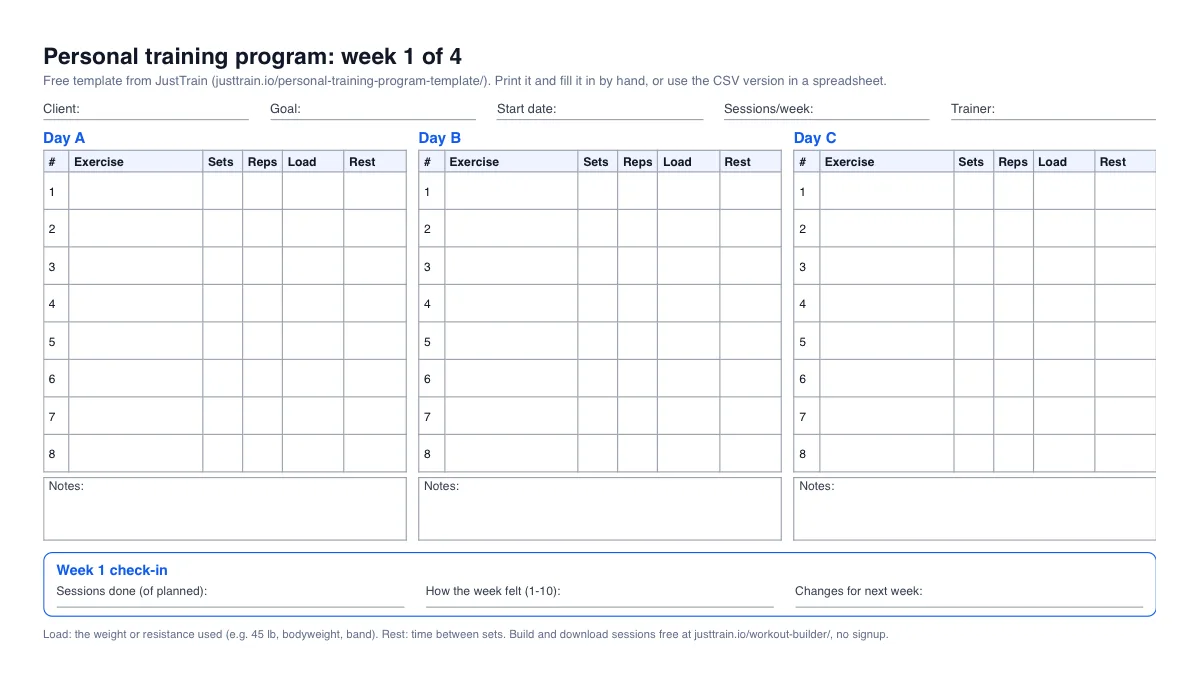
This is a free personal training program template you can use with a client today. It plans 4 weeks of 3 sessions each, with columns for exercise, sets, reps, load, rest and notes, and a check-in row at the end of every week. Download it as a CSV for Google Sheets or Excel, or as a PDF to print. There is no email gate.
Download the template (CSV) Download the printable PDF
Prefer to build the sessions on screen? The free JustTrain workout editor needs no signup.
What should a personal training program template include?
A good personal training program template holds everything you need to run the next block of sessions without rewriting it each week: who the client is, what they are working toward, what they do in each session, and how each week went.
- A client header: name, goal, start date, sessions per week.
- Weeks and days: the program split into weeks, and each week into sessions (Day A, Day B, Day C).
- The prescription for each exercise: exercise, sets, reps, load and rest.
- Notes: coaching cues, substitutions, tempo, or how the client should feel the set.
- A weekly check-in: sessions done against sessions planned, how the week felt, and what changes next week.
Our template has all of these. Here is what goes in each column:
| Column | What to write | Example |
|---|---|---|
| Exercise | The movement, named the way your client will recognize it | Goblet squat |
| Sets | Number of working sets | 3 |
| Reps | Reps per set, or a time for holds | 10, or 30 s |
| Load | Weight or resistance | 35 lb, bodyweight, light band |
| Rest | Rest between sets | 60 s |
| Notes | Cues, substitutions, anything the client should remember | Pause at the bottom |
What's in the free template?
One 4-week program for one client, in two formats.
- CSV (spreadsheet): a client header, then one row per exercise slot: 4 weeks, 3 days a week, 8 exercise slots per day, and a check-in row after each week. It opens in Google Sheets (File, Import), Excel and Numbers. Copy the rows if you want more weeks or more days.
- PDF (printable): one US Letter landscape page per week, with Day A, Day B and Day C side by side, a notes box under each day, and the week's check-in box. Print it and write on it, or hand a copy to your client.
Both files are free to use with your clients. Save a copy for each client so one program never overwrites another.
How do I fill in a program template for a new client?
Fill in the client header first, write week 1 in full, then copy week 1 into weeks 2 to 4 and change only what should progress. Here is a worked example for a made-up client who trains 3 times a week and wants general full-body strength.
- Client header. Name, goal ("general strength, 3 sessions a week"), start date, and your name as trainer.
- Week 1, Day A. Write one line per exercise, in the order the client does them:
| # | Exercise | Sets | Reps | Load | Rest | Notes |
|---|---|---|---|---|---|---|
| 1 | Goblet squat | 3 | 10 | 35 lb | 90 s | Pause at the bottom |
| 2 | Incline push-up | 3 | 8 | Bodyweight | 60 s | Hands on a bench |
| 3 | One-arm dumbbell row | 3 | 10 each side | 25 lb | 60 s | |
| 4 | Romanian deadlift | 3 | 10 | 2 × 25 lb | 90 s | Slow on the way down |
| 5 | Plank | 3 | 30 s | Bodyweight | 45 s |
- Days B and C. Write them the same way, with different exercises or a different emphasis.
- Weeks 2 to 4. Copy week 1, then decide what progresses: for example, one more rep per set, or a little more load where the client finished every set of the week before with good form. Write the change in the Notes column so the client sees it.
- Check-in. At the end of each week, fill in the check-in row with the client: sessions done out of sessions planned, how the week felt on a 1 to 10 scale, and what you'll change next week.
The exercises and numbers above only show how to fill in the template. They are not a program for any particular person; you choose what fits your client.
Can I build the program in a free workout editor instead?
Yes. If you'd rather not type into a spreadsheet, the JustTrain workout editor runs in your browser, is free, and needs no signup. It builds one session at a time, so build Day A, Day B and Day C as three sessions.
- Open the editor and choose Or Create Manually.
- Name the session (for example "Week 1, Day A") and select Manually add content.
- Add the exercises with their sets, reps, weight and rest.
- Select Share Session, then Just Download Session, to get a PDF you can print or send to your client.
Build it in the free workout editor, no signup
The free workout builder page walks through the editor with screenshots. For planning across several weeks, see the workout program creator.
When does a program template stop being enough?
A template works well while you have a few clients and nothing else to keep in step with it. It gets harder when programs live in one file per client, sessions in a calendar, and packages and payments somewhere else, because every change has to be made in more than one place.
That is where an app helps. JustTrain is a coaching app for personal trainers: session scheduling and tracking, packages, contracts and payments, workout programming, and a client app, the JustTrain Training Hub, in one place. It is free for up to 3 clients. Paid plans start at $19.99/month. If you keep client details in a sheet as well, our free client tracking sheet covers that side, and the free personal trainer app page compares free options.
Personal training program template FAQ
Is this personal training program template free?
Yes. Both the CSV and the PDF are free to download and use with your clients, with no email or signup.
Can I use the template in Google Sheets?
Yes. Download the CSV, then in Google Sheets choose File, then Import, and upload it. It also opens in Excel and Numbers.
What should a PT workout plan template include?
A client header (name, goal, start date, sessions per week), the weeks and days of the program, and for each exercise the sets, reps, load, rest and notes. Add a weekly check-in so you can see how the week went before you change the next one.
How many weeks does the template cover?
4 weeks, with 3 sessions a week and up to 8 exercises per session. In the CSV, copy rows to add more weeks, days or exercises.
Is there a blank workout template I can print?
Yes. The PDF version is blank and prints on US Letter paper in landscape, one page per week.
Can I build client workouts online for free instead?
Yes. JustTrain's workout editor runs in your browser with no account. Choose Or Create Manually, add exercises with sets, reps, weight and rest, then download the session as a PDF.
Outgrowing the spreadsheet? Start free with up to 3 clients.
One app for your sessions, payments and programs.