Session scheduling & tracking that just works
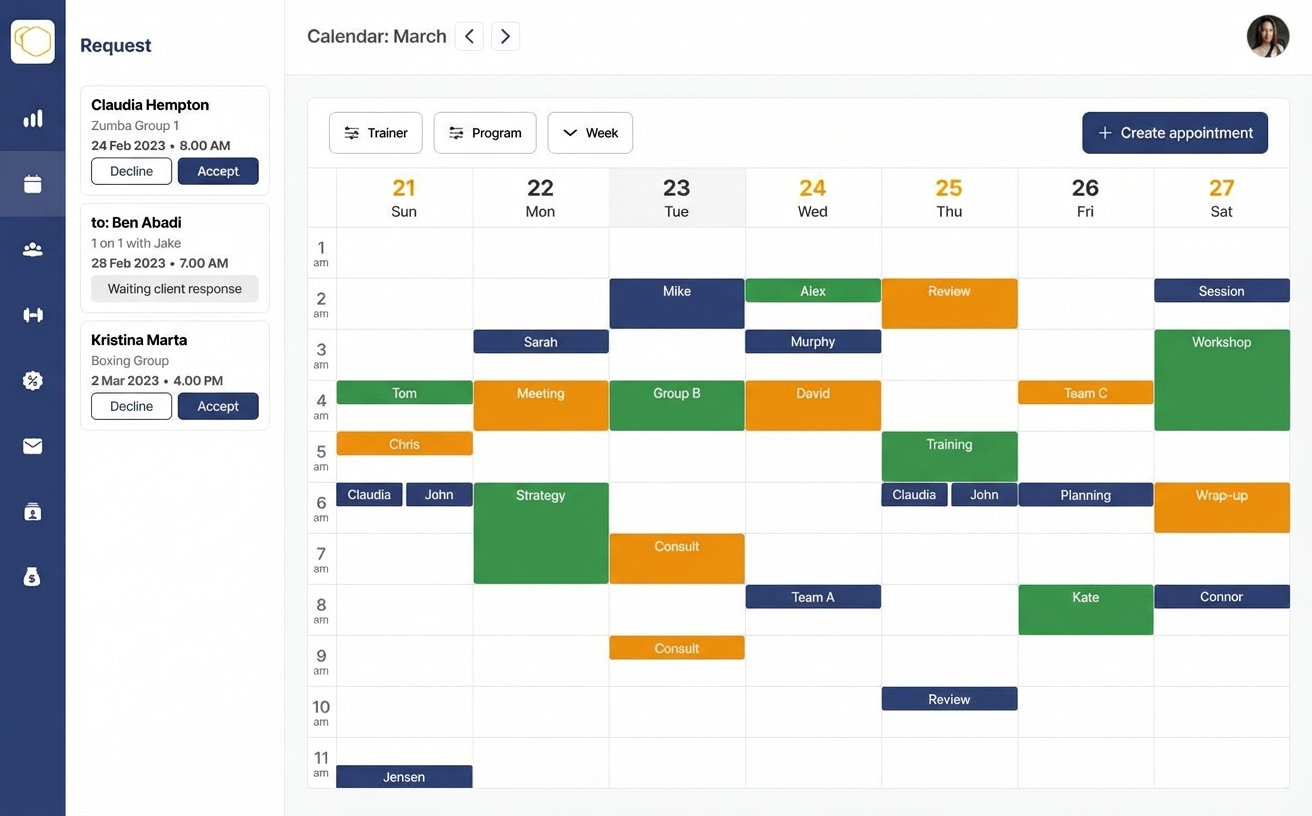
Run 1-on-1s, group classes, and multi-coach schedules from one clean calendar — with package credits and completion tracked end-to-end. Requests and approvals stay clear, policies apply automatically, and everything stays in sync across devices.
One calendar for everything
See all client sessions, personal blocks, and team coverage in one place.
Recurring sessions
Schedule recurring sessions in seconds — weekly check-ins, monthly reviews, or class blocks.
Today’s Sessions
Status-aware, synced, and time zone safe


Strength Session · David M.
COMPLETED09:00–10:00 · Coach John · In-person (Floor A)
Review Call · Sarah J.
PLANNED11:30–12:00 · Time zone safe (Client: UTC-5)
PT Session · Missed
NO-SHOWPolicy applied · Logged for reporting
Personal Appointment
SYNCEDImported from external calendar
From paid package to completed sessions
A practical, step-by-step workflow for studios and coaches: a client buys a 1:1 package, sessions get scheduled with real availability, outcomes are tracked, and the package finishes cleanly.
01. Package & credits
Client buys a 1:1 package (sessions become bookable)
Once payment is complete, the package unlocks session credits and rules (length, buffers, cancellation policy, and where it’s delivered).
sportsCoach can
- check_circleDefine what’s included (number of sessions, duration, buffers)
- check_circleSet cancellation/reschedule rules per service
- check_circleAssign the package to the client and track remaining credits
personClient can
- check_circleSee purchased package, remaining sessions, and what’s included
- check_circleBook sessions using available credits (no manual admin)
- check_circleUnderstand rules up-front (buffers, rescheduling windows)
02. Availability
Availability is real (working hours + busy time)
JustTrain uses coach availability plus device-calendar busy time (and mapped calendars) to show what’s actually bookable — even if someone is busy elsewhere.
sportsCoach can
- check_circleSet weekly working hours and buffer time between sessions
- check_circleBlock off time-off and one-off exceptions
- check_circleConnect calendars so busy events prevent double-booking
personClient can
- check_circleSee only times that fit the coach’s availability and rules
- check_circleConnect their device calendar so their busy time is respected too
- check_circleBook across time zones without confusion
03. Request → Plan
A time is requested (by client or coach) and confirmed
Scheduling works both ways: clients can request sessions, and coaches can propose times. Once accepted, the session becomes “Planned”.
sportsCoach can
- check_circleApprove/decline requests, or propose a different time
- check_circleSchedule on behalf of the client when needed
- check_circleConfigure multi-coach delivery in preference order (auto-fallback)
personClient can
- check_circleRequest a session time from their calendar view
- check_circleAccept a coach-proposed time or request a change
- check_circleSee who the session is assigned to (and when it’s confirmed)
04. Reminders & changes
Reminders go out, and reschedules follow your rules
Planned sessions stay on track with automated reminders. If something changes, rescheduling and cancellations follow the policy you set.
sportsCoach can
- check_circleSet reminder timings (and keep clients accountable)
- check_circleApply rules for late cancels, no-shows, and changes
- check_circleShare meeting details (location, link, notes) on the event
personClient can
- check_circleReceive reminders automatically before sessions
- check_circleRequest a reschedule within policy (no back-and-forth)
- check_circleSee any changes instantly (time, coach, delivery details)
05. Deliver the session
Run the session and capture what happened
Sessions move through clear states. Everyone sees the same truth: what was planned, what happened, and what’s next.
sportsCoach can
- check_circleMark sessions as completed or missed (with an auditable log)
- check_circleAdd notes and next-step actions after the session
- check_circle Attach workouts to the session so plan and delivery stay linked
personClient can
- check_circleSee the session plan and delivery details in one place
- check_circleKnow whether the session is planned, completed, or missed
- check_circleFollow through on next steps (notes, feedback, next booking)
06. Continuity & coach handoff
Book the next session at the client’s convenience (even if coach #1 is busy)
Continuity doesn’t depend on one coach’s calendar. If the preferred coach isn’t available, the session can be delivered by the next coach in the package’s priority order — and the next coach sees the last session’s context directly on their calendar.
sportsCoach can
- check_circle Configure delivery priority at the package level (Coach #1 → Coach #2 → Coach #3)
- check_circle Automatically hand off delivery when the preferred coach isn’t available
- check_circle See last-session notes/status/context right inside the calendar event
personClient can
- check_circle Schedule the next session at a time that works — without waiting for one specific coach
- check_circle Train with the next available coach automatically, based on the package’s preference order
- check_circle Keep momentum between sessions (no gaps, no reschedule ping-pong)
07. Package completion
Track remaining credits and finish the package cleanly
As sessions are completed, credits decrement automatically. Both sides can see what’s left, what’s booked next, and when the package is complete.
sportsCoach can
- check_circleSee package usage and completion at a glance
- check_circlePrompt renewal or next package when the client is close to finished
- check_circleKeep scheduling continuous (book the next session immediately)
personClient can
- check_circleSee remaining sessions and what’s already booked
- check_circleFinish the package without admin messages or manual tracking
- check_circleRenew and continue scheduling seamlessly
Shared visibility across your team
Running a studio or a team? See availability across multiple coaches, set recurring availability blocks, and coordinate coverage without chaos.
-
date_range
Availability that matches reality
Define working hours, time and day-off blocks — per coach .
-
swap_vert
Multi-coach delivery (preference order)
Configure a session to be delivered by multiple coaches in priority order. If the first coach isn’t available, it routes to the next coach automatically.
-
groups
Group sessions and packages
Schedule group classes and let clients book with group session packages.
-
visibility
Shared calendar visibility
Teams get the right level of visibility to coordinate smoothly.
A calendar experience your clients actually use
Clients see everything in one place: upcoming sessions, what’s changed, what’s next, and what to do when it’s time to train.
Push reminders
Automatic reminders before sessions — no coach intervention needed.
Request a new time
Clients can request reschedules within your policy — with clear approval.
Workouts attached
Assign specific workouts to sessions so clients have the plan at session time.
Completion, notes & feedback
Clients can mark complete, add notes, and submit feedback post-session.
Session status
Requested → Planned → Completed | Missed
A highly visual status flow that makes intent, schedule, and outcomes obvious at a glance — for coaches, clients, and teams.
mark_email_unread Requested
A coach or client proposes a time. Either side can request — then it’s confirmed into the schedule.
event Planned
A confirmed session on the calendar, ready to happen.
check_circle Completed
The session happened — logged cleanly for follow-ups and reporting.
cancel Missed
No-show or missed session — visible immediately and easy to act on.
Sync with device calendars (and everything connected)
Avoid double-bookings and save hours of back-and-forth. JustTrain syncs with the calendars on your device — and any calendars mapped to them — so coach and client busy time is always respected.

Google Calendar
Sessions appear in the calendars people actually use — and busy blocks are detected so availability stays accurate.

Outlook / O365
Works great for work calendars and shared team calendars mapped to the device/account — no manual availability checks.
event_busy Busy time tagging (coach + client)
JustTrain clearly tags and registers when coaches and clients are busy (from any connected calendar), so scheduling stays conflict-free — even when someone is booked elsewhere.
Simplify your schedule. Protect your time.
Replace back-and-forth messages with a clear workflow: clients request, you approve, policies apply, reminders send, and session outcomes are logged — for 1-on-1s, teams, and classes.